
In brief. A Skywire network has a small set of services, called its deployment, that help visors find each other: relays to bootstrap through, registries of visors, addresses, transports and services, and nodes that set up routes. None of them can read traffic, and apart from the dmsg relays none of them carry it. They are open source, they are part of the same skywire program, and they run inside a visor. One command sets up a whole private network.
What a deployment is
Visors reach each other by public key, but a key alone does not say where a visor is. A new visor needs a first way into the network, a way to learn the addresses of peers, and someone to install a route's rules on the visors along it. The deployment does these jobs.
The public Skywire network has one deployment, which the project runs. Anyone can run another, for a private network or a test, and visors join it instead of the public one. Its services are listed in a file every visor carries, services-config.json, with each service's public key.
How a new visor joins
- It connects to a dmsg server. dmsg discovery tells it which servers exist. The visor connects out to one or more of them, so it needs no open port, and records which servers it is on.
- It registers. It gives its public addresses to the address resolver, the transports it makes to transport discovery, and any public services, such as a VPN exit, to service discovery.
- It makes transports. Public autoconnect dials public visors, which service discovery lists, and visors connected to them. The address resolver says where each one is, and helps two visors behind NAT punch through to each other.
- It routes. When an app dials, the visor finds a route, often from what it already knows, or asks the route finder. A route setup node installs the route's rules on each visor along it.
After that a visor talks to its peers directly. More and more of what it once asked the services comes from its peers instead. Each visor serves a signed card with its own addresses and a signed list of its transports, and visors relay dmsg streams for each other. The direction is for the deployment to be needed mostly to bootstrap and as a fallback.
The services
dmsg servers
Relays. A visor connects out to a dmsg server, and the server passes encrypted streams between it and other visors. The server cannot read them, and neither end learns the other's IP address. A dmsg link can always be made, which is how a new visor gets started and how a visor reaches others when no direct link is possible. dmsg servers also forward to each other, so two visors on different servers still meet.
dmsg discovery
The registry of dmsg servers and of which visor is on which server, so a visor knows where to reach another key over dmsg.
Address resolver
Records the public IP address and port of each visor for direct TCP transports, and brokers UDP hole punching so two visors behind NAT can link directly. It publishes its records as a signed CXO feed that visors keep a copy of. Most lookups are answered from that copy or from the peer's own signed card, without asking the service.
Transport discovery
The registry of transports between visors. It publishes the routing feed, the transport graph visors calculate routes from, as a signed CXO feed that ships only the parts that change. It also records when each visor is online, from that visor's own feed, and keeps per-transport bandwidth. Both feed the reward system. skywire cli ut reads the uptime it records.
Route finder
Calculates routes over the whole transport graph. A visor usually finds routes itself from its own transports and its neighbours' signed transport lists. The route finder is there for a visor that cannot, such as a small board or a browser tab.
Service discovery
Lists public visors and the public services they run, such as VPN and SOCKS5 exits, with where each is. Autoconnect and the exit pickers read it.
Route setup nodes
Install a route's rules on each visor along it. A setup node signs a capability for each hop and is never on the data path. A visor installs rules only from setup nodes it trusts. Two visors that already share a transport build a one-hop route without one.
Transport setup nodes
Ask a visor that trusts them to dial a given key. That is how a transport gets made from the other side, such as a direct transport to a visor behind NAT.
STUN server
Tells a visor what kind of NAT it is behind and the address the internet sees, which decides whether hole punching can work.
Config service
Serves the deployment's service keys and addresses to visors, and publishes them as a signed CXO feed, so the deployment can change a key without a new release.
GeoIP service
Looks up the country and location of an IP address, which service discovery uses to show where exits are.
All of them are subcommands of skywire svc:
	Skywire services

Usage:
  skywire svc

Available Commands:
  ar          Address Resolver Server for skywire
  conf        print services-config.json file
  confbs      Config Bootstrap Server for skywire
  ip          GeoIP service for skywire
  rf          Route Finder Server for skywire
  run         Run multiple deployment services in one process
  sd          Service discovery server
  se          skywire environment generator
  sn          Route Setup Node for skywire
  stun        STUN server for skywire
  tpd         Transport Discovery Server for skywire
  tps         Transport setup server for skywire

Flags:
  -v, --version  version for svc

Global Flags:
      --jq string  filter JSON output through a jq/gojq expression (implies
                   --json)
      --json       print output as JSON
      --shape      print the output schema skeleton (zero values, all fields)
                   instead of data
      --tui        browse commands and help interactively
The public deployment
Since October 2026 the public network's services run inside visors, each service under its own key, instead of as separate containers. The main services all share one visor process, and other machines run further dmsg servers, setup nodes and transport setup nodes. A visor that hosts services also serves a status page of them.
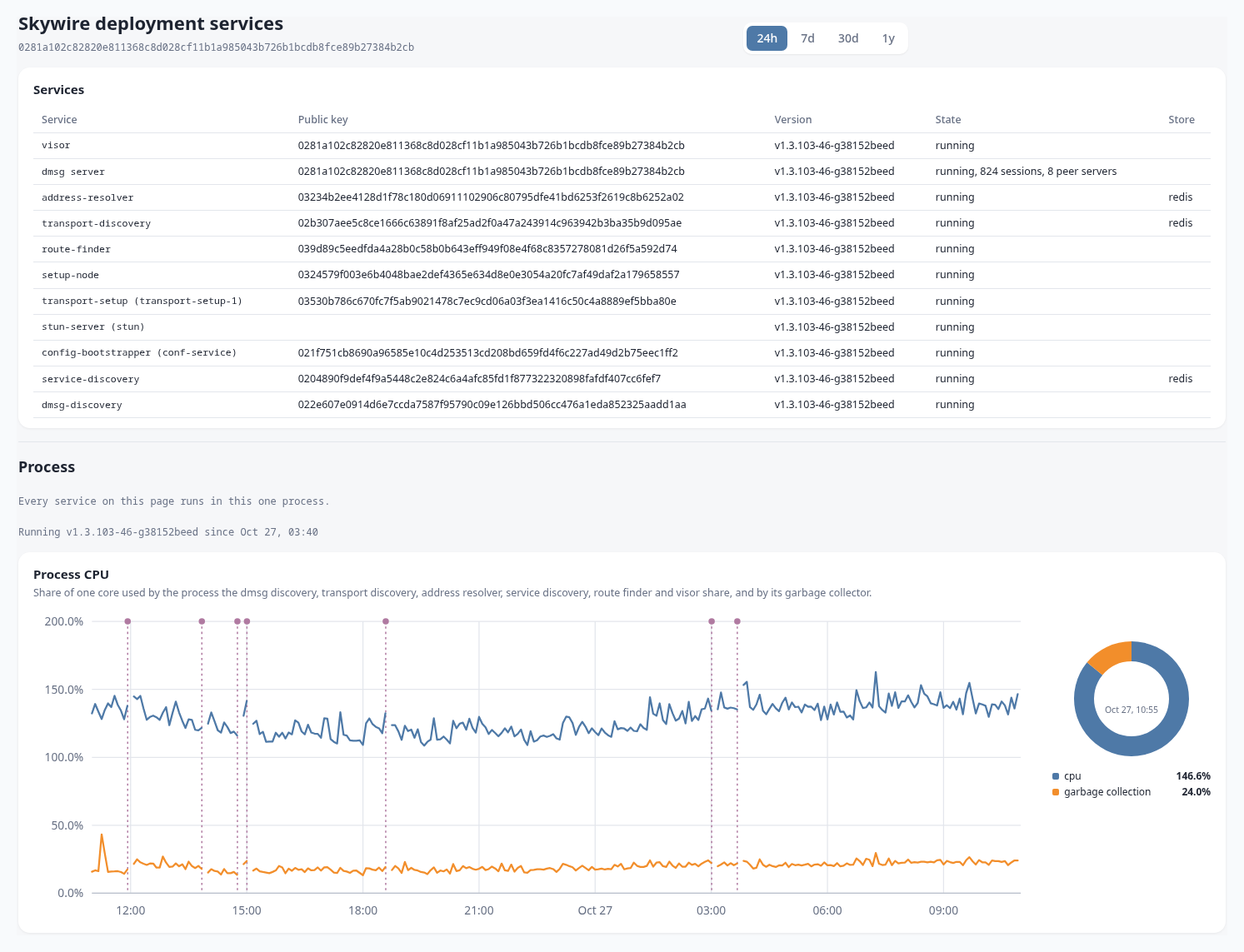
skywire cli svc healthchecks every service and shows its version and latency.- status.skywire.dev charts the network and the services live.
skywire cli sd,skywire cli utandskywire cli svc tpdread what the services hold.
Rewards
Skycoin is not mined. It is distributed through Skywire: 816,000 SKY a year goes to visors on the public network that meet the eligibility rules, paid every day in two equal pools.
- Presence. Shared evenly among eligible visors, with IP and MAC addresses deduplicated and a regional scaling that favours a spread of locations.
- Bandwidth. Shared by the bytes each visor sent over its transports during the day, checked against what the other end received. It is scaled per IP, so splitting one machine's traffic over many keys earns nothing extra.
To be eligible a visor needs enough uptime, as transport discovery recorded it, a reward address set with skywire cli reward <address>, a recent Skywire version, and a hardware survey that passes the checks. A visor sends its survey on its own. Browser visors are not eligible.
skywire cli reward rules prints the full rules, and skywire cli reward lookup shows a visor's daily payouts. Payouts are announced in @skywire_reward on Telegram.
Run your own
A whole deployment runs inside one visor. On a packaged install, set the dmsg server's public address in /etc/skywire.conf and run autoconfig:
DEPLOYMENT='203.0.113.7:8080'
skywire autoconfig
Without a package, pass the same to the config generator:
skywire cli config gen --deployment 203.0.113.7:8080 -o skywire-config.json
The visor then runs every service, and uses this deployment instead of the public one. Only two ports need to be open: the dmsg server's port, TCP and UDP, and that port plus 13 over UDP for hole punching. A redis store is optional. Without one, the services keep their records in memory.
To join another visor to it, print the deployment's services file with skywire cli config deployment, copy it over, and point that visor at it with SKYDEPLOY in its /etc/skywire.conf. Browser visors can join a private deployment too.
The full guide, with ports, keys, DNS names for browser visors and regenerating a config, is running your own deployment. Deployment health covers checking one.